
Monday, August 9, 2010

Tech Time: WiMAX

In simple terms, Worldwide Interoperability for Microwave Access or WiMAX, means wireless broadband. Imagine if you will, a giant hotspot right across the island with high-speed Internet access. That’s WiMAX.

WiMAX offers speeds comparable to DSL and cable with download speeds of up to 10 Mbps. It also offers comparable reliability and accessibility. But, that is where the similarities end.

Notably, WiMAX is consumer installed. Pick up a WiMAX modem from the local mobile or computer store, plug it in and it is installed. No CDs, software drivers or technicians necessary to get the service up and running in minutes.

Because WiMAX by definition is wireless, no landlines or hardwire installations are needed. That means, no wait times, no need to have strangers visit your home and no ugly cables running all over the house.

Thousands of towers have been upgraded to facilitate island wide wireless broadband making the service readily accessible to most Jamaicans living in populated areas. The wireless 4G signal is available in many locations where cable and DSL are not available.

WiMAX really sets itself apart from hardwire Internet options with its mobility. With a USB dongle, WiMAX users can take the high-speed Internet on the road.

Of course, WiMAX wouldn’t be a practical option if not comparable on cost, which it is. Both pre and post-paid plans offer unlimited data transfer with competitive fees.

All in all, WiMAX is fast, reliable, mobile, easy and cheap, like the Internet should be.

Interface with us:
On email: famefm@rjrgroup.com
On SMS: 876-878-FAME (18768783263)

Monday, August 2, 2010

Tech Time: Blackberry OS 6.0


With the increasing popularity of innovative smart phone platforms like iPhone, Android and Windows Mobile, Research In Motion (RIM) have had to step up their game to remain competitive, and they do this with the soon to be released Blackberry OS 6.0.

The very first thing that users will notice is the redesigned home page which is highly customisable. Long overdue feature like an updated media player, universal search and powerful browser bring the new OS inline with features already available on iPhone and Android devices.

Blackberry uses OD 6.0 to improve some features for which BB already has the lead, making a great user experience even better. The new embedded image feature will boost the robust Blackberry email while the wildly popular Blackberry Messenger (BBM) gets s sexy new look and easier interface.

Smart phones have revolutionaries the way we communicate; mobile social networking is critical to the success of any handset. Blackberry recognising this truism, has integrated social networking into the OS has offers simultaneous posting to multiple social networking platforms.

The official announcement is expected later today with a roll out perhaps as soon as later this month. RIM is also expected to announce the launch of the Blackberry Bold 9800 also called the Torch, RIM’s first slide phone set to rival the iPhone 4.

Windows 7 Tip: Click on the Options tab in the Windows 7 calculator of a range of different calculators. This offers many different unit conversions (length, weight, volume and more), date calculations (how many days between two dates?), and spreadsheet-type templates to help you calculate vehicle mileage, mortgage rates and more. Source: Tech Radar


Interface with us:
On email: famefm@rjrgroup.com
On SMS: 876-878-FAME (18768783263)
Thursday, July 22, 2010

Tech Time: HP Touchsmart


Interface with us:
On email: famefm@rjrgroup.com
On SMS: 876-878-FAME (18768783263)

Monday, July 12, 2010

Tech Time: Protecting Your Phone


If you are prone to losing your Blackberry, RIM has found a solution for you; of course, iPhone found it first.

Later this year, you will be able to install Blackberry Protect and app which will help you “wipe, lock or locate” a lost device with the help of your PC (sorry Mac users). To make it work, you’ll be required to download and install the Blackberry protect app to your handset and your PC.

You can use the programme to help you locate a lost phone in a couple of ways. First, you can view the location of the phone on a map or your can activate the “loud ring” feature which will override any prior audio setting which might have been on the phone. If someone else has found the phone, you can send them a message – a custom message you compose can appear on the phone’s screen, even if the phone is locked.

Speaking of locked, if you forgot to lock you phone before losing it, use Blackberry Protect to lock it remotely or, for an extra level of protection, wipe all the data on the phone. Wiping all your data on the phone itself does not mean that you have lost all your data. Blackberry Connect allows you to back up you contacts, calendar, tasks, browser bookmarks and text messages over WiFi or 3G to the cloud, making the information instantly accessible if you wish to migrate the data to a new device.

These features are all similar to Find My iPhone successfully introduced by Apple earlier this year. Though the Find My iPhone app is free from the iTunes store, it only works with a US$99 Mobile Me subscription. Regardless of platform, these “wipe, lock and locate” features only work if the phone is on AND connected via WiFi or 3G. BES (Blackberry Enterprise Server) users, iPhone users and adventurous third-party software adopter already have access to these features, but the introduction of Blackberry Protector in the fourth quarter will provide a sense of security for the causal BB user – that is, if they don’t mind all their data being stored in the cloud.

Windows 7 Tip: Win+M minimizes everything

Interface with us:
On email: famefm@rjrgroup.com
On SMS: 876-878-FAME (18768783263)

Tuesday, June 29, 2010

Tech Time: Motorola Milestone Review


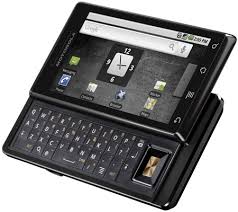
Jamaicans hungering for an Android based smart phone will find, this is their summer. The quad band GSM Motorola Milestone launches in just a few short weeks.

The much hyped Motorola Milestone has several really cool, yet practical features:
  1. The Android 2.1 OS is the latest, fastest and most efficient version of Android, offering seamless integration with Google products including email and an advanced search feature that looks through contacts, content and the web simultaneously to help you find what you are looking for
  2. The brilliant 3.7’ touch screen supports multiple gestures including double tap and pinch for zoom with an intuitive haptic feedback feature and an ambient light aware display
  3. Two keyboards allow users to switch between a virtual on-screen keyboard and physical QWERTY keyboard revealed under a slim-line slider
  4. Dedicated keys for the most common functions including HOME, MENU, BACK, SEARCH, VOLUME and CAMERA
  5. A 5 MP camera with dual LED flash, built-in 4X digital zoom, auto-focus and 720x480 DVD quality video recording which you can upload straight to YouTube
  6. Multiple wireless connectivity options including 3G, WiFi, Bluetooth® and GPS

Many refer to the Milestone as an iPhone killer, and what of Blackberry? The Milestone’s metal casing gives the phone a sturdy, but heavy feel tipping the scales at 6 oz as compared to less than 5 oz for most Blackberry and iPhone models. The Android Market is expanding like none other leaving the Blackberry Appworld in the dust and providing serious competition to the leading iTunes Store.

Like the iPhone, the Milestone can download and play customised ringtones in multiple formats including, most significantly, iTunes AAC files. Both phones have accelerometers.

Unlike the iPhone, Milestones haptic response and micro SD expansion slot (supporting up to 32 GB) make the device user friendly even if you need to keep your charger close to use it.

As the tagline suggests, Motorola Milestone offers little compromise. BBM may force me to hold on to my Blackberry, but my iPhone may get dusty if I hit this Milestone.


Windows 7 Tip: Windows 7 now provides a standard way to switch your display from one monitor to another, or a projector - just press Win+P and choose your preferred display. (This will have no effect if you've only one display connected.) Get more tips.


Interface with us:
On email: famefm@rjrgroup.com
On SMS: 876-878-FAME (18768783263)

Tuesday, June 15, 2010

Tech Time: Software - Browsers

Regardless of the platform you are working on, PC, Mac or Linux, your browser is your “window to the internet”. Browsers have come a long way from the popular Netscape, which ushered in a new era of graphical Internet interfacing. Today’s browsers are used for more than just research; shopping, banking, communication, entertainment and more recently productivity are all now core functions of the browser.

There are a lot of browser options out there, and best of all, their FREE! Firefox, Chrome, Internet Explorer (IE), Opera and Safari dominate the field with now common features like tabbed browsing, thumb nail previews, RSS feeds, customisable skins, widgets and add-ons.
Generally, browsers are easy to use and have built in search engine capabilities. This means, all you really need to do, is enter a keyword in the address bar and the browser will figure out the exact address, the site you visited previously or bring up several options for you choose from based on the keyword entered.

Private browsing and cookie management are critical for modern browsers, giving users the power to control how much personal information about them is available online.

Though many Browsers boast similar features, they occasionally display pages differently and provide different levels of security. Like your anti-virus software, your browser should always be up-to-date with the latest version to prevent pop-ups, viruses, spy ware and phishing threats that may result from security holes.

Windows 7 Tip: Right-click an empty part of the desktop, select Personalise > Desktop Background, then hold down Ctrl as you click on the images you like. Choose how often you'd like the images to be changed (anything from daily to once every 10 seconds), select Shuffle if you'd like the backgrounds to appear in a random order, then click Save Changes and enjoy the show.


Interface with us:
On email: famefm@rjrgroup.com
On SMS: 876-878-FAME (18768783263)